
AI Insights beta
Order Lifecycle includes two AI-powered analysis features that use the Claude API to turn raw event data into plain-language summaries:
- Per-order insights - an on-demand button inside the Order Lifecycle field that analyses a single order's journey
- Store insights widget - a dashboard widget that analyses aggregate store metrics over a configurable time window
Both features are opt-in and require an Anthropic API key.
Setup
1. Get an Anthropic API Key
Visit console.anthropic.com → API Keys → Create Key.
2. Add the Key to your Environment
Add the key to your .env file:
ANTHROPIC_API_KEY=sk-ant-...3. Configure the Plugin
In the Craft control panel go to Settings → Order Lifecycle → Integrations and enter $ANTHROPIC_API_KEY in the Anthropic API Key field. The $ prefix tells Craft to resolve the value from your environment at runtime.
Alternatively, set it in config/order-lifecycle.php:
'anthropicApiKey' => '$ANTHROPIC_API_KEY',Per-Order Insights
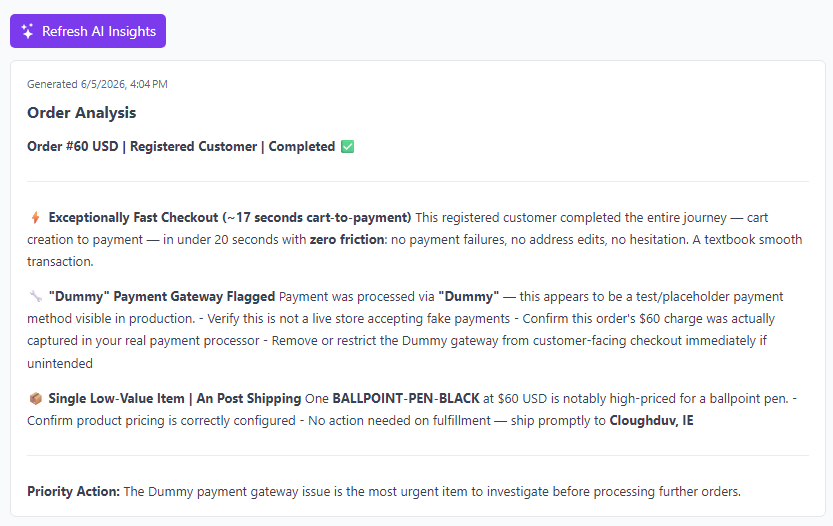
Once the API key is configured, an AI Insights button appears in the Order Lifecycle field on every order edit page (above the timeline).
How It Works
- Click AI Insights on any order
- The plugin sends the order's full event timeline and key metrics to Claude
- Within a few seconds a plain-language summary appears beneath the button
- The result is saved automatically - the next time you open the order the last insight is shown without another API call
The button label changes to Refresh AI Insights once an insight has been saved. Click it at any time to regenerate with the latest event data.
What Is Analysed
The analysis includes:
- Event timeline (all events in chronological order with messages)
- Order total, currency, and completion status
- Customer type (guest vs registered)
- Time from first to last event
- Number of payment attempts and failures
- Number of email delivery failures
- Count of address events (includes initial address entry, not just edits)
- Count of line item modifications
What Claude Responds With
Claude returns 2–4 concise insights covering friction points, payment behaviour, notable patterns, and anything worth investigating. The response may use bold text for key figures and bullet points for action items, which are rendered in the field. For example:
This order had 3 payment attempts before succeeding - worth checking your gateway logs for a timeout.
- The customer changed their shipping address twice during checkout
- All emails sent successfully No other anomalies detected.
Storage
Saved insights are stored in the orderlifecycle_logs table with event type aiInsights. They are excluded from the timeline display but are retained in full in the database alongside all other lifecycle events. The most recent insight is shown in the field.
Store Insights Dashboard
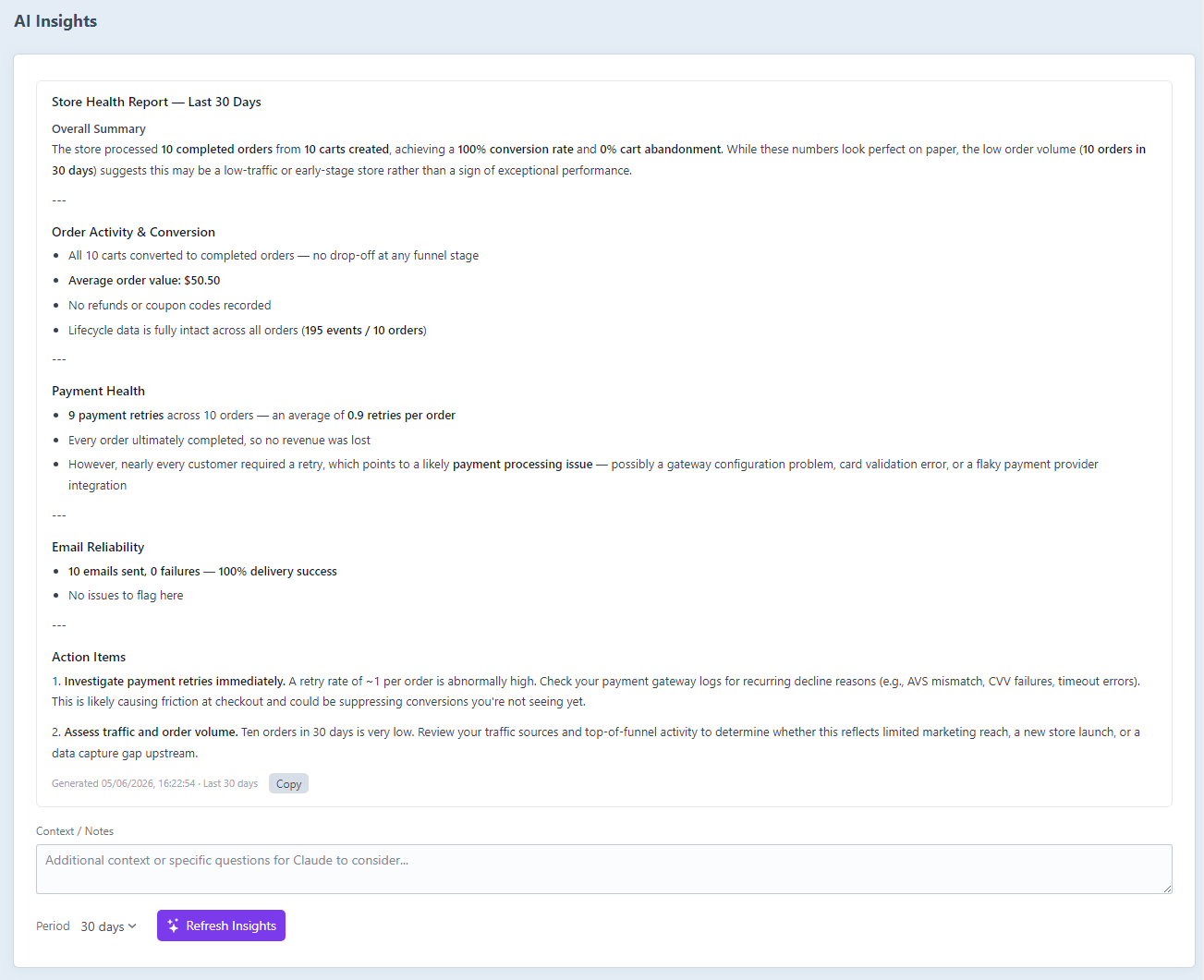
The primary place for store-level AI insights is Order Lifecycle → AI Insights in the Craft sidebar. This page is only visible when an Anthropic API key is configured.
Generating Insights
Select a time window from the dropdown (7, 14, 30, 60, 90 days, or All time), then click Generate Insights. The plugin queries aggregate metrics from the orderlifecycle_logs table and sends them to Claude. Results appear on the page and are saved to storage/order-lifecycle/store-insights.json.
Click Refresh Insights at any time to regenerate. The timestamp and time window of the last generation are shown below the text.
Stale Insights Notice
If saved insights are more than 7 days old an amber warning banner is displayed above the result, prompting you to regenerate. The saved insights remain visible and usable - the notice is informational only.
Copy to Clipboard
A Copy button appears in the metadata row beneath the insights text. Click it to copy the raw markdown text to your clipboard. The button briefly shows Copied! as confirmation.
Context / Notes
A Context / Notes textarea sits above the generate button. Any text you enter there is appended to the prompt sent to Claude. Use it to:
- Focus the analysis: "We ran a promotion this week - factor that into the abandonment figures"
- Ask a specific question: "Why might conversion have dropped compared to last month?"
- Provide store context: "We sell digital products only, so address changes should be minimal"
The notes field is not saved between page loads - it is sent once per generation.
Store Insights Widget
The Order Lifecycle AI Insights dashboard widget is also available if you prefer AI insights on the main Craft dashboard. Add it via Dashboard → New Widget → Order Lifecycle AI Insights. In the widget settings you can choose the time window.
The widget and the AI Insights dashboard page share the same stored result - generating from either location updates the same file.
What Is Analysed
| Metric | Description |
|---|---|
| Carts created | Unique orders with a cartCreated event in the period |
| Orders completed | Unique orders with an orderCompleted event |
| Conversion rate | Orders completed / carts created |
| Abandonment rate | Carts that did not complete |
| Average cart value | Mean totalPrice from orderCompleted snapshots |
| Payment attempts | Total paymentAttempt events |
| Avg. payment attempts per order | Attempts / completed orders |
| Refunds | Total paymentRefunded events |
| Coupons applied | Total couponApplied events |
| Emails sent / failed | emailSent and emailFailed counts |
| Email success rate | Sent / (sent + failed) |
| Top event types by volume | Top 8 event types ranked by count |
What Claude Responds With
Claude returns a store health report covering overall activity, conversion, payment health, email reliability, and specific recommendations. The response uses markdown formatting - section headers, bold key figures, and bullet lists - which is rendered in the dashboard. Saved as a JSON file in storage/order-lifecycle/.
Customising Prompts
Both prompts can be overridden in Settings → Order Lifecycle → Integrations → AI Prompt Customisation, or via config/order-lifecycle.php. Leave a field blank to use the built-in default.
Use {placeholder} tokens anywhere in your prompt text - they are replaced with live data before the request is sent to Claude.
Per-Order Prompt Tokens
| Token | Example value | Description |
|---|---|---|
{total} | 99.99 EUR | Order total and currency |
{status} | processing | Order status handle |
{completed} | yes / no | Whether the order is complete |
{customerType} | guest / registered | Customer account type |
{totalEvents} | 14 | Total number of lifecycle events |
{duration} | 45 minutes | Time from first to last event |
{paymentAttempts} | 3 | Total payment attempts |
{paymentFailed} | 2 | Failed payment attempts |
{emailFailures} | 0 | Email delivery failures |
{statusChanges} | 2 | Number of status changes |
{lineItemChanges} | 3 | Line item additions, removals, updates |
{addressChanges} | 1 | Address set/removed events — includes initial address entry, not just edits |
{shippingChanges} | 1 | Shipping method changes |
{eventTimeline} | (multi-line list) | Full chronological event list with timestamps and messages |
Store Prompt Tokens
| Token | Example value | Description |
|---|---|---|
{days} | the last 30 days / all time | The configured time window as a phrase |
{totalLogs} | 4821 | Total lifecycle events in the period |
{uniqueOrders} | 312 | Orders with at least one lifecycle event |
{cartsCreated} | 540 | Unique carts created |
{ordersCompleted} | 289 | Orders reaching completion |
{conversionRate} | 53.5 | Completion rate as a percentage |
{abandonmentRate} | 46.5 | Abandonment rate as a percentage |
{avgCartValue} | 75.50 EUR | Mean total of completed orders |
{paymentAttempts} | 310 | Total payment attempt events |
{avgPaymentAttempts} | 1.07 | Average attempts per completed order |
{refunds} | 8 | Total refund events |
{couponApplied} | 41 | Coupon applied events |
{emailsSent} | 867 | Emails sent successfully |
{emailsFailed} | 3 | Email delivery failures |
{emailSuccessRate} | 99.7 | Email success rate as a percentage |
{topTypes} | (multi-line list) | Top 8 event types ranked by volume |
Via config file
// config/order-lifecycle.php
return [
    '*' => [
        'anthropicApiKey' => '$ANTHROPIC_API_KEY',

        'orderInsightsPrompt' => 'You are a helpful assistant analysing an e-commerce order.

Order: {total} - {status} - Customer: {customerType}
Payment attempts: {paymentAttempts} ({paymentFailed} failed)
Timeline:
{eventTimeline}

Give one paragraph of plain advice for the store manager.',

        'storeInsightsPrompt' => '',  // empty = use built-in default
    ],
];
Privacy
AI insights send event data to Anthropic's API. The data included is:
- Event type names and timestamps
- Auto-generated event messages (e.g. "quantity increased from 1 to 3")
- Order totals and currency
- Customer type (guest / registered - not email addresses)
- Aggregate counts (no individual customer data in store insights)
If your lifecycle logs contain sensitive information in event messages or payloads, review those before enabling this feature. You can reduce PII in logs by disabling Collect User IP Address and Collect User ID in Settings → Order Lifecycle → Logging.
See Also
- Configuration - Full settings reference including
anthropicApiKey - Event Tracking - What events are recorded automatically
- Timeline View - Viewing the order event timeline
- Statistics - The store statistics dashboard and widget