
Managing Deposit Types
Deposit types are the admin-managed list of deposits available for assignment to products.
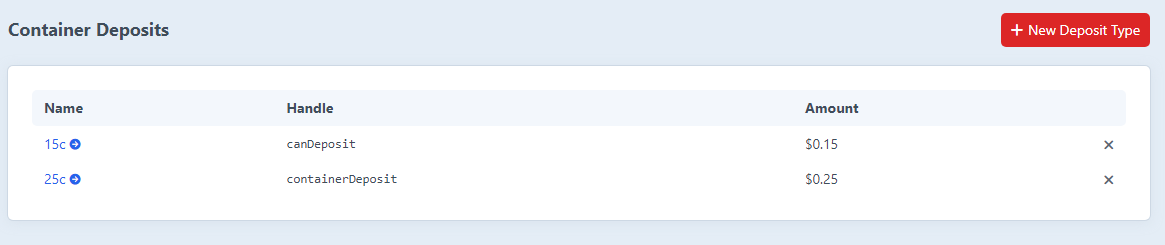
Create a deposit type
- Go to Container Deposits → Deposit Types.
- Click New Deposit Type.
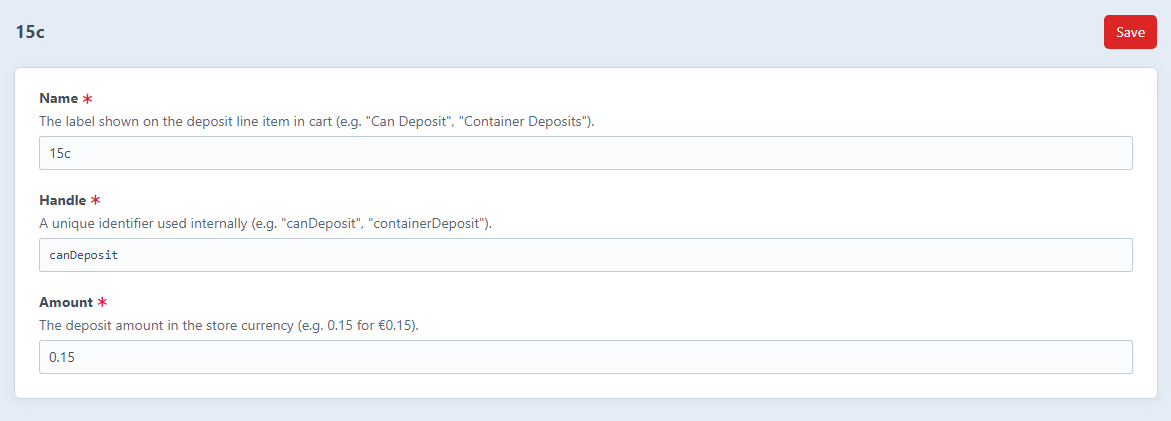
- Fill in:
- Name - shown on the line item in the cart (e.g. Can Deposit, Container Deposits).
- Handle - internal identifier, used for the deposit purchasable's SKU. Must start with a letter; camelCase recommended.
- Amount - the deposit value in the store currency (e.g.
0.15for €0.15).
- Click Save.
When you save, the plugin also creates (or updates) a hidden DepositPurchasable element that represents the deposit in the cart.
Edit a deposit type
Click any row on the index page. Changing the Amount updates the price on every future cart calculation. Existing carts pick up the new price the next time they recalculate.
WARNING
Changing a deposit's handle updates the SKU used on future line items. Existing line items keep their original SKU in the order snapshot.
Delete a deposit type
Click the X icon on the index page. The matching DepositPurchasable element is deleted alongside the type.
Line items previously created from a deleted deposit remain on completed orders for reporting purposes, but the purchasableId foreign key is set to null.
Suggested setup for Re-turn (Ireland)
| Name | Handle | Amount |
|---|---|---|
| 15c | smallContainer | 0.15 |
| 25c | largeContainer | 0.25 |
These match the official tiers published by Re-turn for the period beginning February 2024 (150 ml – 500 ml = €0.15; over 500 ml – 3 L = €0.25).