Cart Behaviour
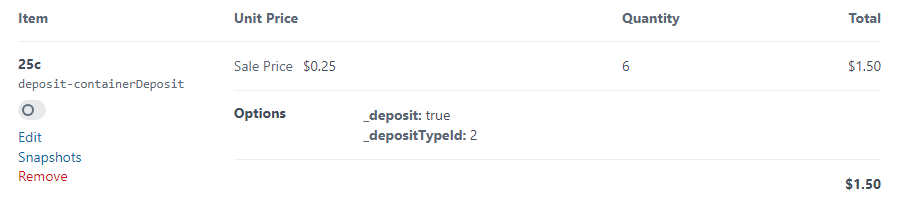
Where deposits appear
Deposit line items appear alongside their parent products in:
- The cart page
- The checkout review
- Order confirmation emails
- The CP order detail view
They are stored as ordinary LineItem records with their options array marked { "_deposit": true, "_depositTypeId": <id> }.
Twig templates can identify them with:
twig
{% for item in cart.lineItems %}
  {% if item.options._deposit ?? false %}
    <tr class="deposit">…</tr>
  {% else %}
    <tr>…</tr>
  {% endif %}
{% endfor %}
Synchronisation rules
The sync runs on Order::EVENT_BEFORE_SAVE for any cart that has not been completed:
| Cart event | Effect on deposit line items |
|---|---|
| Product with deposit added | New deposit line item created (or qty incremented on an existing one). |
| Qty of a deposit-bearing product changed | Matching deposit line item qty updated to reflect the new total. |
| Deposit-bearing product removed | Deposit line item removed when no parent items remain for that type. |
| Deposit field removed from a product | Same as removal - deposit drops out on next save. |
| Order completed | All further sync is skipped; deposits are preserved as-is on the completed order. |
Properties of deposit line items
| Property | Value |
|---|---|
purchasable | A DepositPurchasable element |
description | The deposit type's name |
sku | deposit-<handle> |
price | The deposit type's amount |
qty | Sum of the qty of every parent line item sharing the deposit type |
taxCategoryId | containerDeposit category - no VAT |
shippingCategoryId | Free shipping (deposit doesn't add shipping cost) |
options._deposit | true |
options._depositTypeId | The deposit type ID |
Performance
The sync logic only calls Order::setLineItems() when a deposit was actually added, removed, or had its quantity changed. Idle saves are no-ops, so there's no recalculation cost for carts that already match expected state.